
Speeding alerts for company vehicles
Allokit detects speeding across your fleet from GPS data. Each alert shows the speed reached, the road’s limit, how long the speeding lasted, the segment travelled and the driver who held the vehicle.
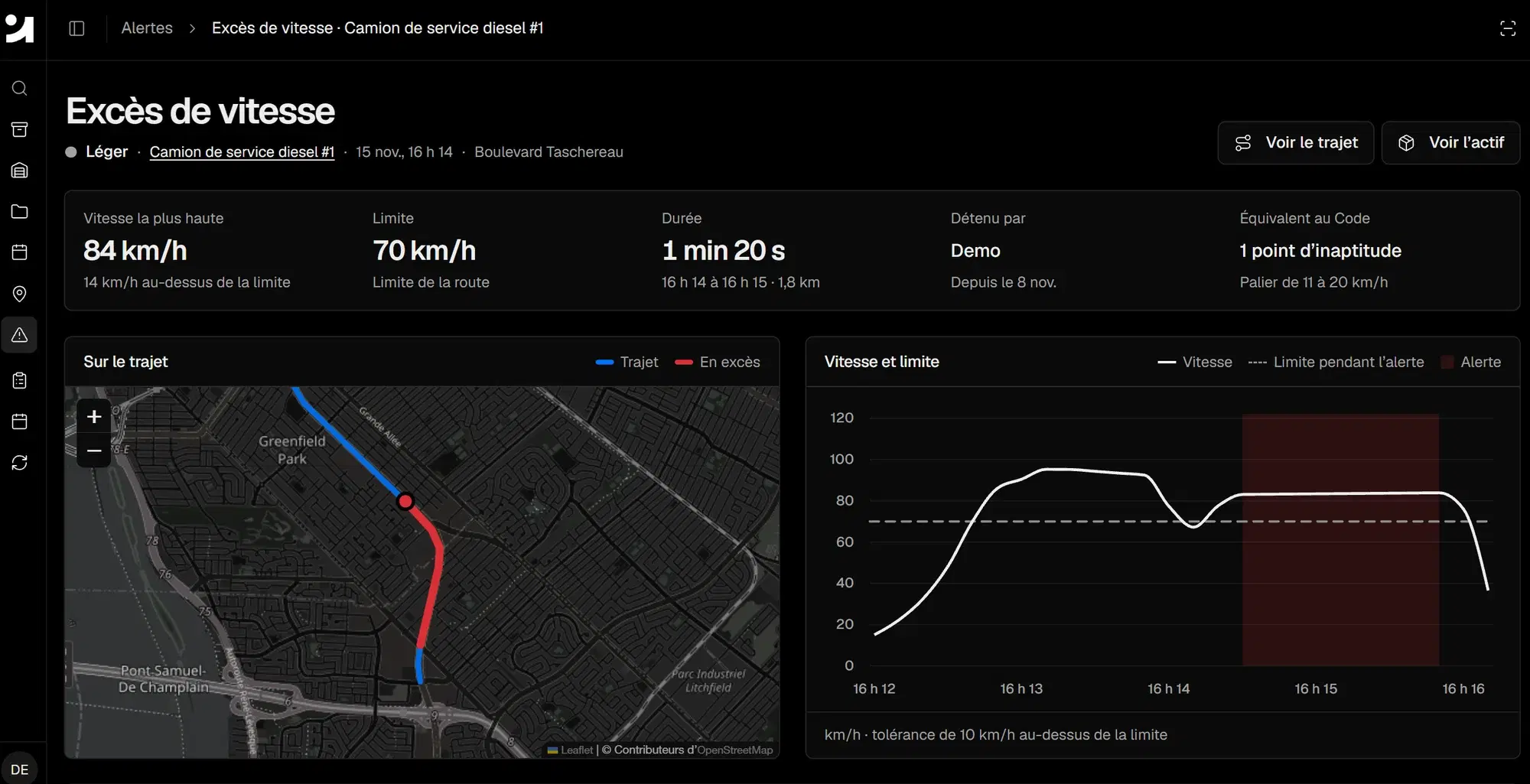
Allokit creates a speeding alert when a vehicle’s speed exceeds the road’s limit beyond the set tolerance. The alert shows the severity level, the top speed, the limit, the duration, the distance, the driver and the number of demerit points that speeding would carry under the Québec Highway Safety Code.
What is a speeding alert?
A speeding alert reports that a company vehicle drove faster than the posted limit on a road. In fleet management software, the alert is produced automatically from the speed sent by the vehicle’s GPS.
Allokit keeps each alert with its context: the trip, the speed chart during the event and the employee who held the vehicle. The fleet manager finds the alerts for every vehicle in the Alerts section of Allokit.
What each speeding alert shows
- Top speed
- Allokit shows the highest speed reached during the event and the gap with the road’s limit, for example 14 km/h over the limit.
- Road limit
- Allokit compares the vehicle’s speed with the speed limit of the road segment it was on at the time.
- Duration and distance
- The alert shows when the speeding started and ended, how long it lasted and the distance driven over the limit.
- Segment on the map
- The map shows the vehicle’s trip and highlights in red the segment driven over the limit.
- Speed chart
- The chart shows the vehicle’s speed before, during and after the alert, with the speed limit in force.
- Driver
- Allokit shows the employee who held the vehicle at the time, based on the assignment history.
- Highway Safety Code equivalent
- Allokit shows the number of demerit points that speeding would carry under the Québec Highway Safety Code scale, for example 1 point for 11 to 20 km/h over the limit.
- Severity level
- Allokit gives each alert a severity level based on how far over the limit the vehicle went, so the most serious events can be handled first.
How Allokit detects speeding
The GPS sends the speed
The vehicle’s GPS device sends its position and speed to Allokit while it is on the move.
Allokit compares speed with the limit
Allokit compares the vehicle’s speed with the road’s speed limit and applies a tolerance above the limit, for example 10 km/h.
Allokit creates the alert
When the speed goes past that threshold, Allokit creates a speeding alert with the speed, the duration, the distance and the road segment.
The manager reviews the alert
The fleet manager opens the alert, views the full trip or the vehicle’s record and sees which driver held the vehicle.
The company follows up
The fleet manager discusses driving with the employee based on precise data: the place, the time, the speed and the duration of the event.
When speeding alerts are useful
- A service truck drives 84 km/h in a 70 km/h zone: the alert shows the segment, the duration and the driver.
- A construction company wants to reduce the risk of accidents and the tickets its employees receive while driving company vehicles.
- A fleet manager prepares a meeting with an employee based on the speeding alerts for their vehicle.
- A member of the public reports a company truck driving too fast: the manager finds the vehicle’s trip and speed at the time given.
- An insurer asks which road safety measures the company applies to its fleet.
Frequently asked questions about speeding alerts
How does Allokit know the road’s speed limit?
Allokit matches the vehicle’s position with the speed limit of the road it is on. Limits change from one segment to the next, and Allokit uses the limit of the segment the vehicle is on at each moment.
What is a speeding tolerance?
The tolerance is the margin above the limit at which Allokit creates an alert. With a 70 km/h limit and a 10 km/h tolerance, Allokit creates an alert when the vehicle goes over 80 km/h.
Are the demerit points shown added to the driver’s record?
No. Allokit shows the number of points that speeding would carry under the Québec Highway Safety Code. Only an offence recorded by a police officer, then paid or ruled on, leads the SAAQ to add points to a driving record.
How many demerit points does speeding carry in Québec?
Under the Québec Highway Safety Code, driving 11 to 20 km/h over the limit carries 1 demerit point, and the number of points rises with the size of the excess. Allokit shows the tier that matches each alert.
Is a specific device needed to receive speeding alerts?
Yes. The vehicle has to send its position and speed to Allokit through a GPS, such as the AK Drive OBD device plugged into the vehicle’s diagnostic port.
See your fleet’s speeding events in Allokit.
Show us your vehicles and your needs. Allokit shows you speeding alerts and the other data that helps you manage your fleet.
