
Fleet management software for construction contractors
Allokit tracks construction contractors’ trucks, vans, trailers and machinery in the same software as their tools. The fleet manager sees each vehicle’s location, trips, driver, speeding events and upcoming maintenance.
Allokit is fleet management software built for construction companies. It brings together GPS vehicle tracking, compatible OBD data, speeding alerts, assignment to drivers and jobsites, preventive maintenance and detection of the tools carried in each truck.

What is construction fleet management?
Construction fleet management means tracking a company’s vehicles and machinery between the yard, the warehouse and the jobsites. It covers vehicle location, trips, employee driving, assignment to drivers and projects, preventive maintenance and the equipment being carried.
A construction company uses its fleet to move crews, tools and materials to several jobsites every day. Allokit ties each vehicle to that work: the fleet manager sees which truck is on which jobsite, who is driving it and which tools are on board.

GPS vehicle tracking and trip history
Allokit shows the last position sent by each vehicle’s GPS on a single map. The history keeps trips, stops, arrival and departure times and distances travelled.
The AK Drive OBD device plugs into the vehicle’s diagnostic port. Depending on the vehicle’s make, model and year, it also sends Allokit the odometer reading, engine hours, fuel level, battery voltage and fault codes.
See vehicle GPSSpeeding alerts and demerit points
Allokit compares each vehicle’s speed with the speed limit of the road it is on. When a vehicle exceeds the limit beyond the set tolerance, Allokit creates a speeding alert with the top speed, the duration, the distance and the road segment on the map.
Each alert shows the employee who held the vehicle at the time and the number of demerit points that speeding would carry under the Québec Highway Safety Code. The fleet manager can then discuss driving with the employee based on precise data.
See speeding alerts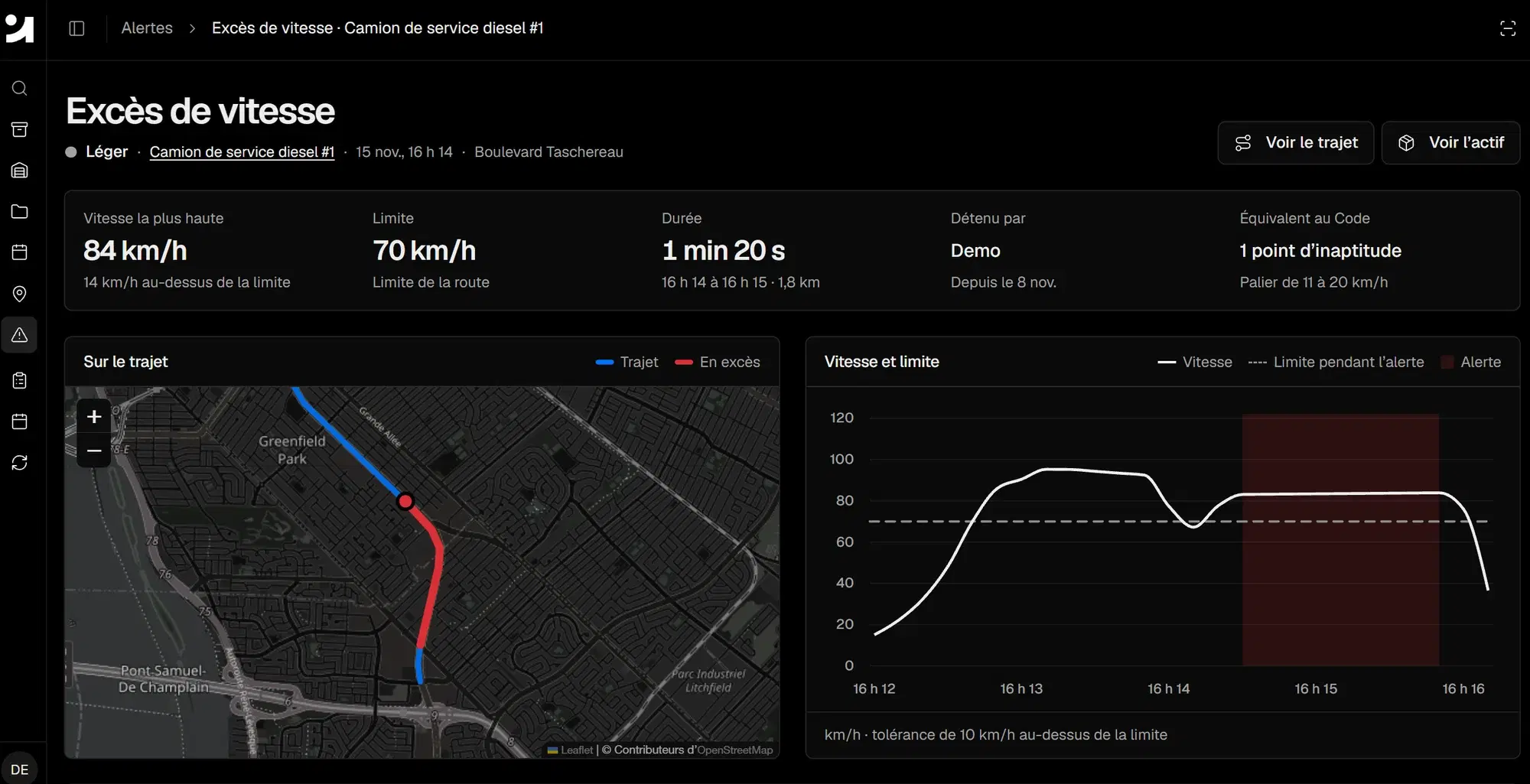
Assigning vehicles to drivers and jobsites
Allokit links each vehicle or machine to a driver, a crew, a jobsite or a property. The assignment history shows which employee held the vehicle on a given date.
Allokit scheduling lets you reserve a vehicle or a machine for a jobsite’s dates and see booking conflicts before work starts.
See asset assignmentPreventive maintenance for vehicles and machinery
Allokit schedules each vehicle’s inspections and servicing by date, by usage or from the data the vehicle sends, such as mileage and engine hours when they are available.
Repairs, warranties and documents stay in the vehicle’s record. Allokit shows an alert when a service comes due.
See preventive maintenanceThe tools carried in each truck
The Allokit GPS also acts as a Bluetooth gateway. When a tool fitted with a Bluetooth tracking tag is in or near the truck, Allokit records the detection with the vehicle’s location.
The fleet manager sees which tools were detected in each vehicle and where, without asking the crew to scan them.
See tool location trackingA fleet inventory connected to tools and equipment
Allokit keeps vehicles, trailers, machinery and powered equipment in the same inventory as tools and consumables. Each record holds the make, model, year, VIN, plate, photos, documents and condition of the vehicle.
See asset inventoryAllokit fleet management features
Each page covers one fleet management feature in detail and explains how it works in Allokit.
Frequently asked questions about construction fleet management
What is fleet management software?
Fleet management software centralizes a company’s vehicle data: location, trips, driving, assignment, maintenance and documents. Allokit adds tracking of the construction tools and equipment carried by those vehicles.
Does every vehicle need a GPS to use Allokit?
No. A vehicle can be managed in Allokit without a tracking device, with its record, its assignment and its maintenance. The AK Drive OBD GPS device adds location, trips, speed and, depending on the vehicle’s compatibility, engine data.
Can Allokit track machinery that has no OBD port?
Yes. Machines, trailers and equipment without a compatible OBD port can be fitted with a standalone GPS that sends their location to Allokit.
How does Allokit detect speeding?
Allokit compares the speed sent by the vehicle’s GPS with the speed limit of the road it is on. Beyond the set tolerance, Allokit creates an alert with the top speed, the duration, the distance, the driver and the equivalent demerit points.
Is Allokit a fit for a small fleet?
Yes. Allokit serves construction companies that run a few trucks as well as those that run a full fleet of vehicles and machinery. A pilot project lets you equip part of the fleet first.
See your fleet and your tools in one view.
Show us your vehicles, your machinery and your field needs. Allokit recommends the devices and alerts that are useful for your fleet.
